No Changed, faça o seguinte:
private void fileSystemWatcher1_Changed(object sender, FileSystemEventArgs e)
{
txtNotificacoes.Text += String.Format("Alteração: {0} {1}", e.FullPath, Environment.NewLine);
txtNotificacoes.Text += String.Format("Nome: {0} {1}", e.Name, Environment.NewLine);
txtNotificacoes.Text += String.Format("Evento: {0} {1}", e.ChangeType, Environment.NewLine);
txtNotificacoes.Text += String.Format("----------------------- {0}", Environment.NewLine);
}
No Created, faça o seguinte:
private void fileSystemWatcher1_Created(object sender, FileSystemEventArgs e)
{
txtNotificacoes.Text += String.Format("Criação: {0} {1}", e.FullPath, Environment.NewLine);
txtNotificacoes.Text += String.Format("Nome: {0} {1}", e.Name, Environment.NewLine);
txtNotificacoes.Text += String.Format("Evento: {0} {1}", e.ChangeType, Environment.NewLine);
txtNotificacoes.Text += String.Format("----------------------- {0}", Environment.NewLine);
}
No Deleted, faça o seguinte:
private void fileSystemWatcher1_Deleted(object sender, FileSystemEventArgs e)
{
txtNotificacoes.Text += String.Format("Exclusão: {0}, {1}", e.FullPath, Environment.NewLine);
txtNotificacoes.Text += String.Format("Nome: {0} {1}", e.Name, Environment.NewLine);
txtNotificacoes.Text += String.Format("Evento: {0} {1}", e.ChangeType, Environment.NewLine);
txtNotificacoes.Text += String.Format("----------------------- {0}", Environment.NewLine);
}
No Renamed, faça o seguinte:
private void fileSystemWatcher1_Renamed(object sender, RenamedEventArgs e)
{
txtNotificacoes.Text += String.Format("Alteração de Nome: {0} {1}", e.FullPath, Environment.NewLine);
txtNotificacoes.Text += String.Format("Nome: {0} {1}", e.Name, Environment.NewLine);
txtNotificacoes.Text += String.Format("Evento: {0} {1}", e.ChangeType, Environment.NewLine);
txtNotificacoes.Text += String.Format("----------------------- {0}", Environment.NewLine);
}
Pronto, eventos criados.
Agora vamos criar os métodos responsáveis pelos botões CriaArquivo, CriaDiretório e DeletaArquivo. Crie o método CriaArquivo:
private void CriaArquivo()
{
try
{
//crio a string caminho, que recebe o caminho do txtPasta
//crio a string arquivo, a concateno com \\ e com o que for digitado no txtArquivoDiretorio
string caminho = txtPasta.Text;
string arquivo = caminho + "\\" + txtArquivoDiretorio.Text;
//faço uma verificação, se foi digitado algo no txtArquivoDiretorio
if (txtArquivoDiretorio.Text != string.Empty)
{
//faço outra verificação, se o arquivo da variável arquivo não existe
if (!File.Exists(arquivo))
{
try
{
//caso não exista, uso o File.Create
File.Create(arquivo);
}
catch (IOException er)
{
//se der erro entro neste catch customizado
Console.WriteLine("Erro ao criar o arquivo: " + er.Message);
}
}
//se o arquivo da variável arquivo existir, entro no else e exibo uma mensagem ao usuário
else
{
Console.WriteLine("Arquivo já existe!");
}
}
}
catch (Exception)
{
throw;
}
}
O CriaDiretório e DeletaArquivo são parecidos, o que muda são as mensagens de aviso apenas e o tipo da classe, que são File e Directory, dependendo do método. Agora abra a unidade C: da sua máquina e crie a pasta que o FSW usará para monitorar os arquivos. No meu caso, aqui é a exemploFSW.
Agora vamos voltar ao form e dar dois cliques em cada um dos botões do form, para chamar os métodos criados anteriormente. Faça desta forma:
private void btnCriaArquivo_Click(object sender, EventArgs e)
{
CriaArquivo();
}
private void btnCriaDiretorio_Click(object sender, EventArgs e)
{
CriaDiretorio();
}
private void btnDeletaArquivo_Click(object sender, EventArgs e)
{
DeletaArquivo();
}
Pronto, agora compile seu projeto e experimente criar, alterar e excluir arquivos e pastas e veja as notificações que aparecem:
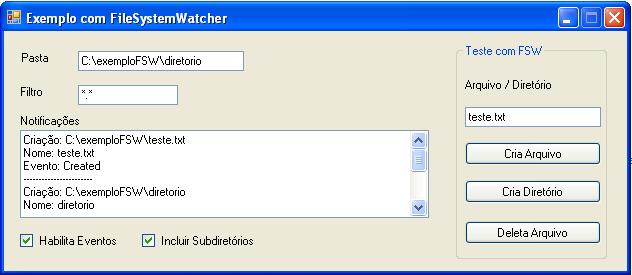
Assim finalizo o artigo. Muito obrigado a todos!
Um abraço, e até o próximo artigo
Wellington Balbo de Camargo
wellingtonbalbo@gmail.com